What is inbound call tracking? How every call is tied to its source
Inbound call tracking is a way to know which ad, publisher or campaign sent each phone call you receive. An inbound call is one the caller places to you.
It works through tracking numbers. A tracking number is a phone number assigned to one source, so the number a caller dials tells you where they came from.
Why inbound call tracking exists
A web click carries its source with it. A phone call doesn't. The moment a call rings, the only thing the system knows for sure is the number that was dialed.
Without tracking, every call looks the same. You can't say which publisher earned a call, which campaign works, or where the next dollar of budget should go.
If two publishers share one number, nobody can prove who sent a call. That's how disputes start.
How inbound call tracking works, step by step
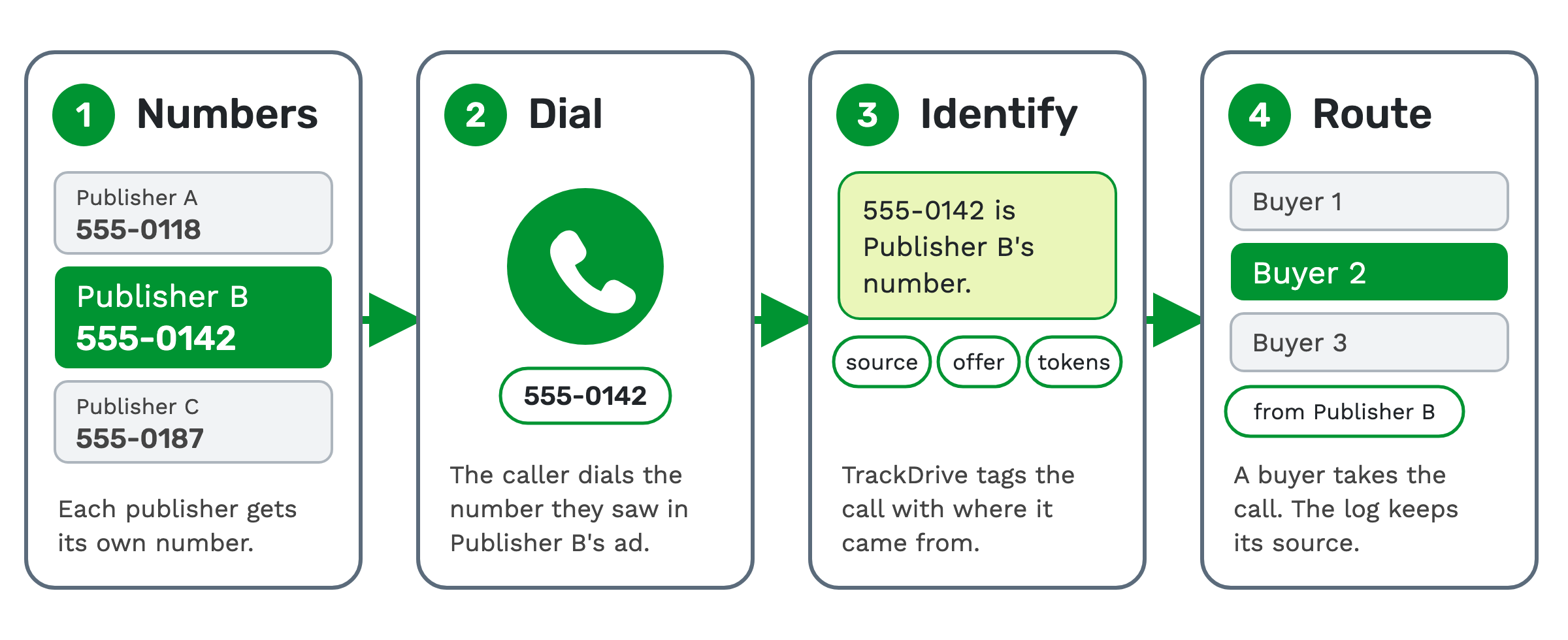
1. Assign the numbers. Each publisher, or traffic source, gets its own tracking number. A publisher is the partner that runs the ads and sends you calls. In TrackDrive, you attach the number to an offer and, optionally, a traffic source. An offer is the campaign the call belongs to, and it decides how calls to that number are routed.
2. The caller dials. The caller sees the number in an ad, on a page or on a mailer, and calls it. To the caller, it's an ordinary phone number.
3. TrackDrive identifies the source. The dialed number is matched the moment the call rings. It tells TrackDrive the offer and the source. TrackDrive then attaches attribution tokens to the call. An attribution token is a key-value pair that describes where the call came from, such as its traffic source.
4. The call is routed and logged. The call goes on to a buyer, still tagged with its source. A buyer is the business that takes the call, such as a call center. Which buyer gets it is a routing decision, covered in how to route inbound calls.
When the call ends, the log records its duration, status, revenue, recording and disposition. A disposition is the outcome of the call, such as not interested or a wrong number.
One tracking number per publisher
The rule that makes tracking work is simple: give every publisher its own number. Then every call is attributable.
You can go finer than that. One offer can have many tracking numbers, each carrying different attribution tokens. A publisher running three campaigns can have a number for each one.
Attribution also follows the caller. Tokens persist on the contact, so a repeat caller is credited to the source that sent them first.
Tracking numbers vs dynamic number insertion
A fixed tracking number works when one source shows one number: a publisher's ad, a mailer, a TV spot.
A website is different. Visitors arrive from many sources but see the same page. Dynamic number insertion (DNI) swaps the number on the page based on where each visitor came from. Then a call from your website is tied to its source too. Dynamic number insertion, explained covers how the swap works.
What you see for every call
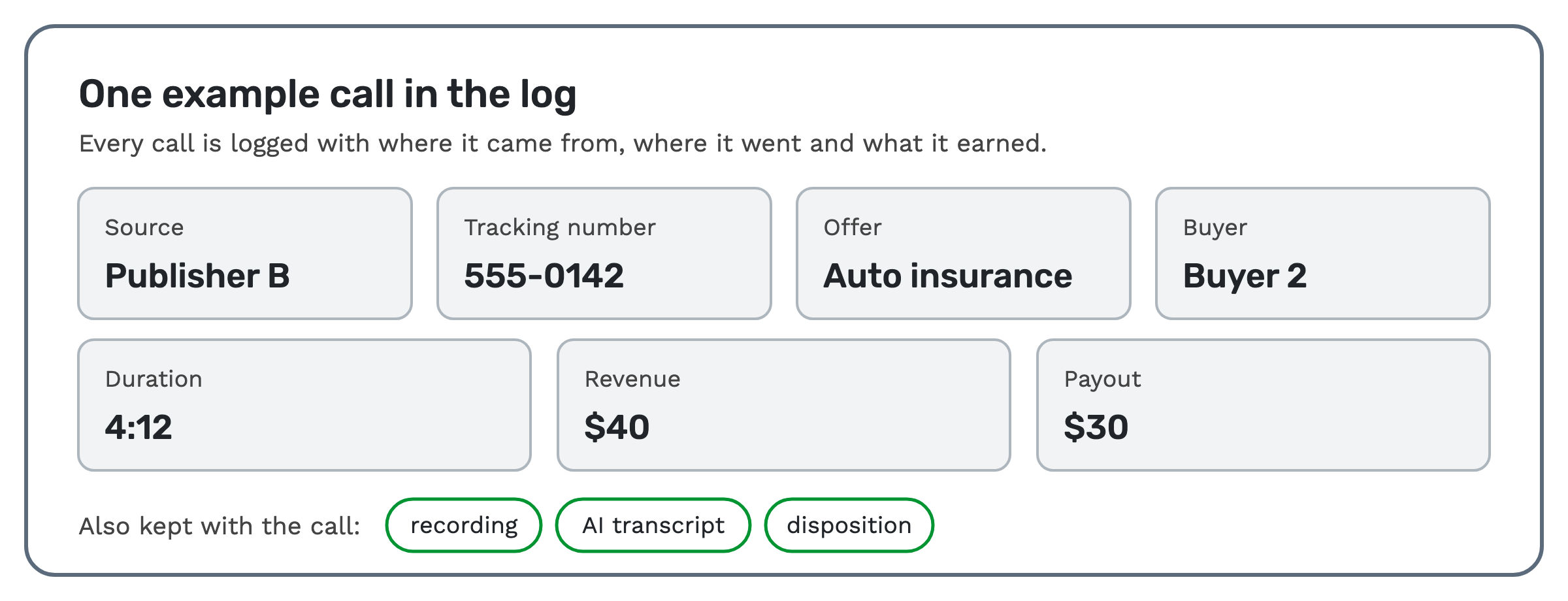 Every call lands in the call log with its source, offer, buyer, timings, geography, custom tokens, revenue, payout and
margin. Revenue is what the buyer pays for the call. Payout is what the publisher earns.
The recording, the AI transcription and the disposition are kept with the call. With AI transcription on, you can search every transcript for what was said, such as a competitor's name or a price.
Summary reports group calls by buyer, traffic source, offer, status and other dimensions. You can export them to CSV once, or on a schedule by email.
That's the point of tracking. You see which publisher sends calls that convert, and which one doesn't.
Who uses inbound call tracking
- Networks use it to see revenue, payout and margin for every publisher and offer.
- Publishers use it to show exactly which calls they sent.
- Buyers use it to see which sources send calls that convert.
- Marketers use it to see which campaign, URL keyword or token drove each call.
When a tracking number isn't enough
Tracking tells you where a call came from. It doesn't decide where the call goes. Filters decide whether a call is eligible, and routing decides who gets it.
If buyers bid on each call before it connects, that's ping-post. Tracking still applies: the post returns a tracking number, and the call is logged against its source.
If you run one campaign from one source, a single tracking number is enough. Add numbers as you add sources.
How it works in TrackDrive
You buy a number under Phone Numbers, choose local or toll-free, and pick the area code or toll-free prefix. The call tracking page lists thousands of local and toll-free numbers, including 888, 877, 855, 844 and 866, in virtually every area code. You can also bring your own Twilio, Plivo or Telnyx account. Numbers on it run through your own carrier, but TrackDrive still bills them: per minute, with a monthly fee per connected number, and texts are billed too.
The guide to buying a tracking number walks through the form. Then make a test call. It confirms the number, the offer and the buyer are set up right, and it creates a real call record you can inspect.
What it costs on TrackDrive
A tracking number has a monthly rate. Inbound calls have a per-minute tracking rate, one for local numbers and one for toll-free, rounded up to the full minute. Those rates include forwarding the call to your buyer over toll-free or SIP; international and premium rate centers can add cost.
There's no onboarding fee. See TrackDrive pricing for commit plans.
Questions people ask
Is inbound call tracking the same as call routing? No. Tracking records where a call came from. Routing decides which buyer gets it. TrackDrive does both on the same call: the tracking number resolves the offer and the source, then routing picks the buyer.
Should I use local or toll-free numbers? Either works for tracking. TrackDrive treats numbers as local or toll-free, with no other type. The difference is the rate: local and toll-free each have their own per-minute rate.
Can I track calls from offline ads? Yes. Call tracking measures calls from online and offline campaigns. Put a dedicated tracking number on the mailer, the billboard or the TV spot.
Can I track calls from my website? Yes, with dynamic number insertion. One snippet of JavaScript on your page swaps in a tracking number for each visitor's source.
See it in action
Request a demo for a live walkthrough tailored to your use case, or start free, with no credit card and no onboarding fee.