What is a call whisper? Whisper messages, explained
A call whisper is a short message played to the person who answers a call, before the caller is connected. It tells them what the call is about, so they pick up ready.
TrackDrive calls these whisper messages. A whisper message plays a brief message to the buyer before connecting, announcing campaign or caller details.
Why brief the buyer first
In pay-per-call, a buyer is the business that receives and pays for calls. The buyer's phone rings, and someone answers.
Without a whisper, that person starts cold. They don't know which campaign sent the call or what the caller wants.
A whisper fills that gap in a few seconds. If your buyer answers calls from more than one campaign, the whisper says which one this is before anyone says hello.
How a whisper message works, step by step
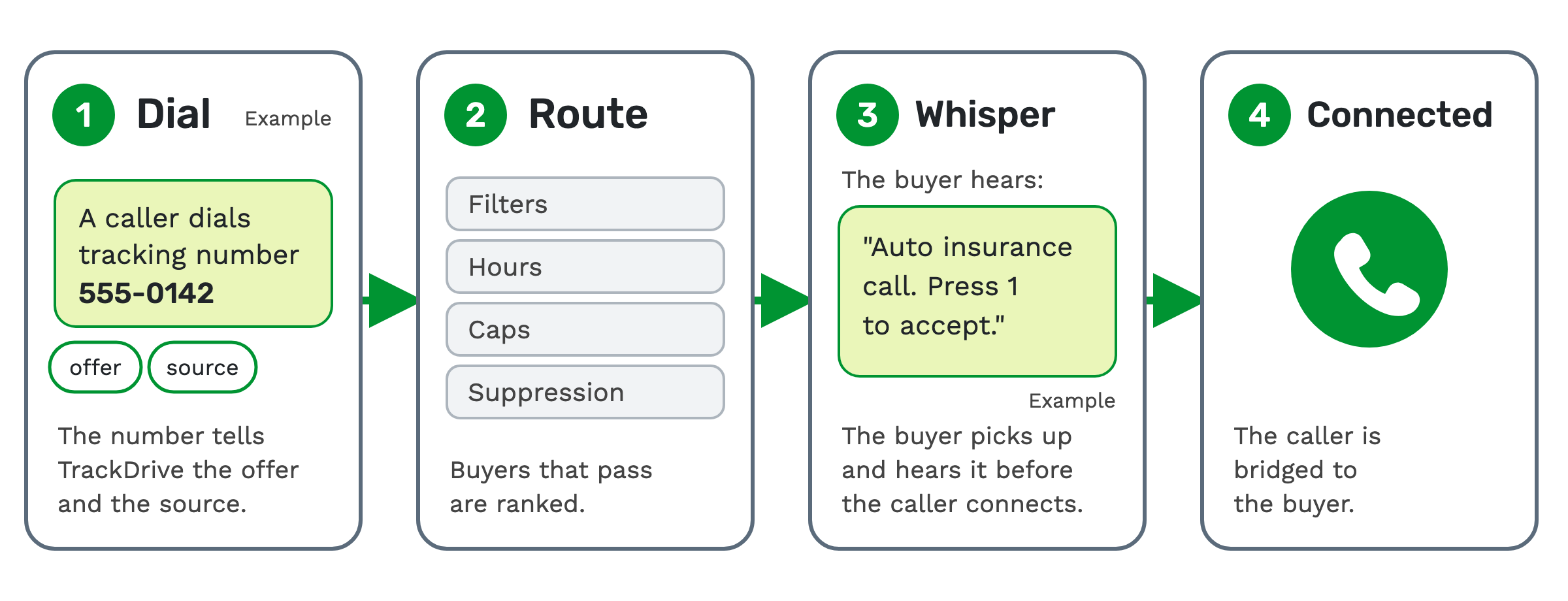
1. The caller dials. A tracking number is a phone number tied to one traffic source. It tells TrackDrive the offer and the source. An offer is the campaign the call belongs to.
2. TrackDrive routes the call. It checks each buyer's filters, hours, caps and suppression list. Then it ranks the buyers that pass. (How to route inbound calls explains how.)
3. The buyer hears the whisper. The buyer picks up and hears the message.
Example: "Auto insurance call. Press 1 to accept."
4. Connected. The caller is bridged to the buyer, and the call goes ahead.
Where the whisper lives in TrackDrive
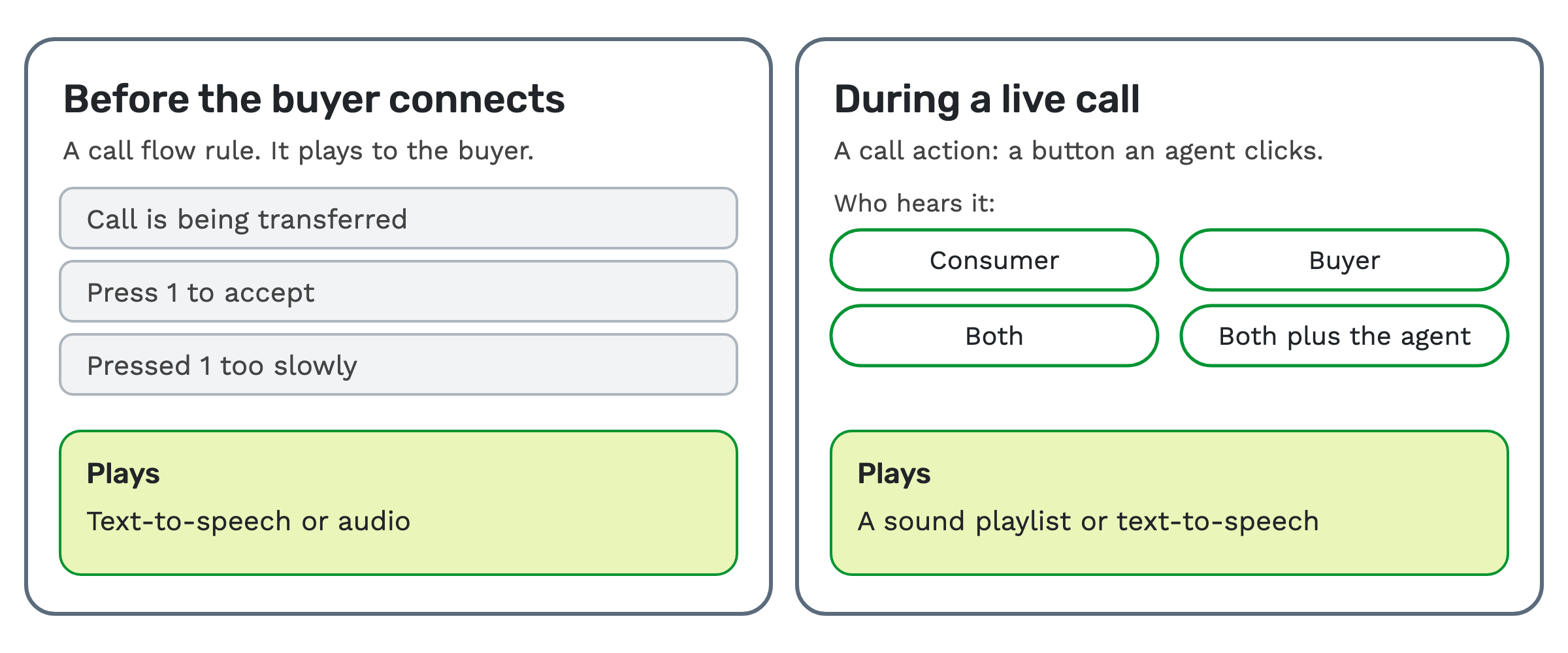
A whisper is a call flow rule. A call flow is a rule that fires at a specific moment during a call to decide what happens next.
The call routers guide explains call flows. TrackDrive's call flow API reference names four rules for the transfer to a buyer:
- Whisper To Buyer that a Call is being Transferred.
- Whisper to Buyer to Press 1 to Accept a Call.
- Whisper to Buyer that they Pressed 1 Too Slowly.
- Calling Buyer Music Played to Caller during Transfers.
The first three speak to the buyer. The fourth plays music to the caller during the transfer.
Spoken text or a recording
Each rule asks one question: play a message? You pick one of three answers:
- No message.
- Speak TTS. Text-to-speech (TTS) is software that reads your typed text aloud. You type the words, and the buyer hears them (on the music rule, the caller does).
- Play audio. You upload a recording, or play from a sound playlist instead.
Sound files are recordings you upload once and reuse for greetings, hold music, voicemail messages and whispers. MP3 is recommended; WAV, OGG and FLAC also work.
A playlist groups sound files. A sound file can carry filters, so it plays only when the call's data matches.
That lets one playlist give different calls different whispers. See the sound files and playlists guide.
Press 1 to accept
A press-1 whisper asks the buyer to accept the call with a key press. You set how many seconds TrackDrive waits for the key press before it continues.
Calls can be marked converted by duration: the call converts once it runs long enough. If Press-1-to-accept is set up, the buyer pressing 1 starts the duration timer. See buyer management.
It can also decide who wins when several buyers ring at once. A buyer group can ring every buyer at the same time. If Press 1 to Accept is on, the first to press 1 wins the call; otherwise the first to answer does.
Whispers during a live call
A whisper doesn't have to wait for the transfer. A call action is a button agents can click during a call to trigger routing, tagging or other in-call actions.
A call action can also play a whisper.
The whisper target can be the consumer, the buyer, both, or both plus the agent. The action plays a sound playlist, or speaks text-to-speech instead.
That spoken text supports token replacement. A token is one named piece of call data, such as the caller's state.
A second setting makes the button stop any audio playing on the call, instead of whispering.
Key presses can run call actions too. Key Press Flows let callers and external agents control a call from their keypad, and one action is playing audio. See the key press flows guide.
Is this the same as call monitoring whisper?
No. In call-center software, "whisper" also names a supervisor speaking to an agent during a live call, to coach them.
TrackDrive's feature pages and help articles don't describe a supervisor whisper. Its whispers are recorded audio or text-to-speech messages.
A call flow rule plays them to the buyer, or a call action plays them during the call.
Whispers, IVRs and recording announcements
These three all play audio, at different moments and to different people.
- An IVR speaks to the caller. It is an automated menu the caller answers with key presses or spoken answers. See what is an IVR?
- A call recording announcement is a pre-recorded message played at the start of the call, to meet consent requirements. See call recording for pay per call.
- A whisper speaks to the buyer as the call is transferred, or to the people you pick during a live call.
What it costs on TrackDrive
The pricing page has no separate line for whisper messages. Inbound calls have a per-minute tracking rate, one for local tracking numbers and one for toll-free, rounded up to the full minute.
That rate includes forwarding the call to your buyer over toll-free or SIP; international and premium rate centers can add cost. There's no onboarding fee. See TrackDrive pricing.
Questions people ask
What does call whisper mean? It means a short message played to the person answering, before the caller is connected. In TrackDrive, a call action can also whisper to the people you pick during a live call.
What is a whisper in a call center? It has two meanings. One is a message played to the agent or buyer before the caller is connected. The other is a supervisor coaching an agent mid-call. TrackDrive's whisper messages are the first kind. A call action can also play a recorded or spoken whisper during a live call, but nobody speaks live.
Can each call get a different whisper? Yes, with sound file filters. A file plays only when the call's data matches, so one playlist can serve different calls.
Can a whisper ask the buyer to accept the call? Yes. The press-1 rule asks the buyer to press 1. In a buyer group that rings every buyer at once, the first to press 1 wins the call when Press 1 to Accept is on. It's off by default.
See it in action
Request a demo for a live walkthrough tailored to your use case, or start free, with no credit card and no onboarding fee.