What is a call queue? Hold queues and callbacks, explained
A call queue is a line of callers waiting for the next free person to answer. Instead of a busy signal, each caller holds until someone can take the call.
TrackDrive calls its call queue the hold queue. When no buyer is immediately available, an offer can park the caller with hold music, then connect them to the first buyer that opens up.
Why queue a call at all
In pay-per-call, a buyer is the business that receives and pays for calls. Sometimes every buyer is busy, and no buyer is immediately available for the next caller.
A hold queue parks that caller instead of rejecting the call or sending it to voicemail. The point is to keep the lead warm instead of dropping it.
How the hold queue works, step by step
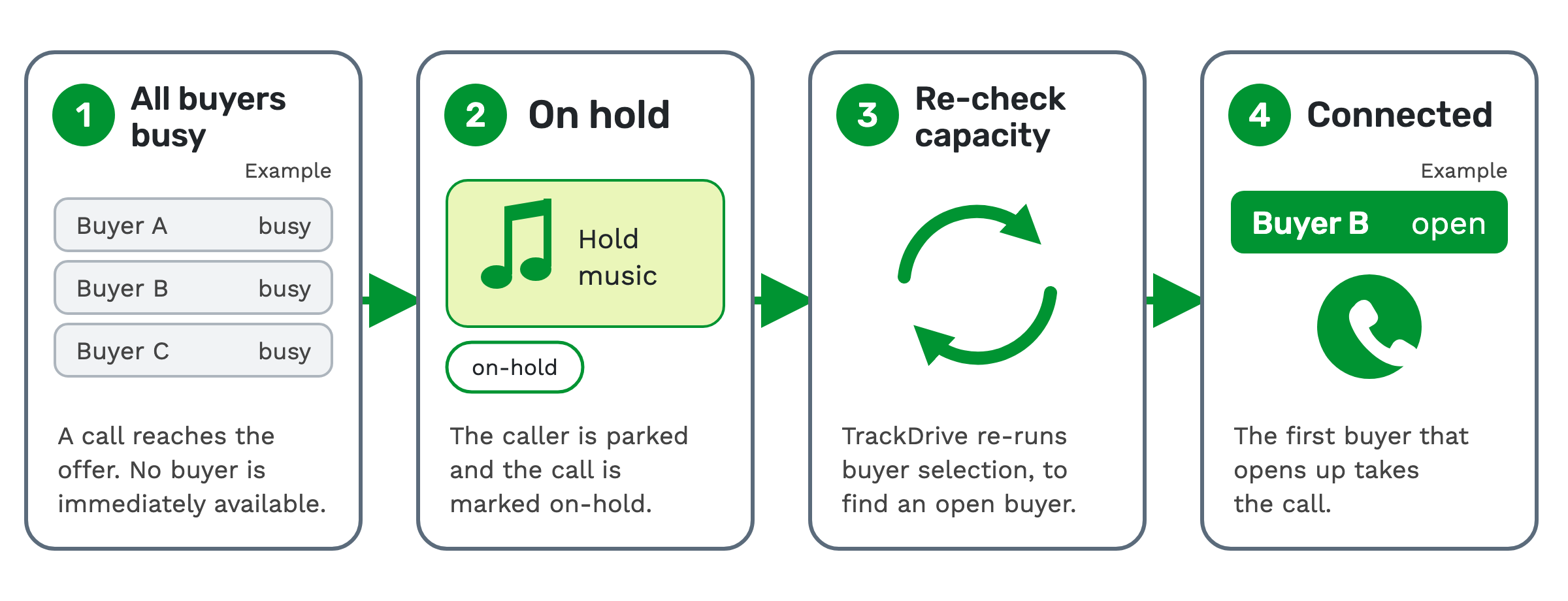
1. All buyers busy. A call reaches an offer, and no buyer is immediately available. An offer is the campaign the call belongs to: its numbers, its buyers and its payouts.
At that moment, routing fires the "add to hold queue" call flow. A call flow is a rule that fires at a set moment in a call to decide what happens next.
2. On hold. The caller is parked and hears hold music. TrackDrive marks the call "on-hold" and records when it joined the queue.
3. Re-check capacity. TrackDrive periodically re-runs buyer selection, looking for an open buyer. Buyer selection is the step that matches and ranks buyers for any call (how inbound call routing works).
4. Connected. The first buyer that opens up takes the call.
The hold queue feature page shows the same four steps.
What sets the size of the queue
Each offer has its own hold queue. You set its capacity, its maximum hold time and its hold music.
The limits live on the call router, and the queue enforces them in real time. Before a caller joins, TrackDrive checks three limits, in this order:
- Caller limit. The most callers the queue can hold.
- Percentage size. A percentage of the offer's total active concurrency cap. A concurrency cap is a limit on how many live calls can run at once.
- Average hold time. The average wait across recent held calls. When it's over your ceiling, new callers are turned away.
If any limit is exceeded, the call is not added to the queue. The next section covers what happens to it instead.
If you set neither a caller limit nor a percentage, the queue size defaults to 20 percent of the offer's total active concurrency cap. For example, a total active concurrency cap of 50 calls gives a default queue of 10 callers.
The campaign hold queue guide explains each setting.
What happens when the queue is full or the wait runs long
Every offer gets three hold queue call flows, created for you: "caller placed in queue", "queue is full" and "max hold time exceeded". You can change the action on each one.
The call routers guide names them "add to hold queue", "hold queue is full" and "hold queue max seconds exceeded". It lists them as their own group, apart from the four exception call flows.
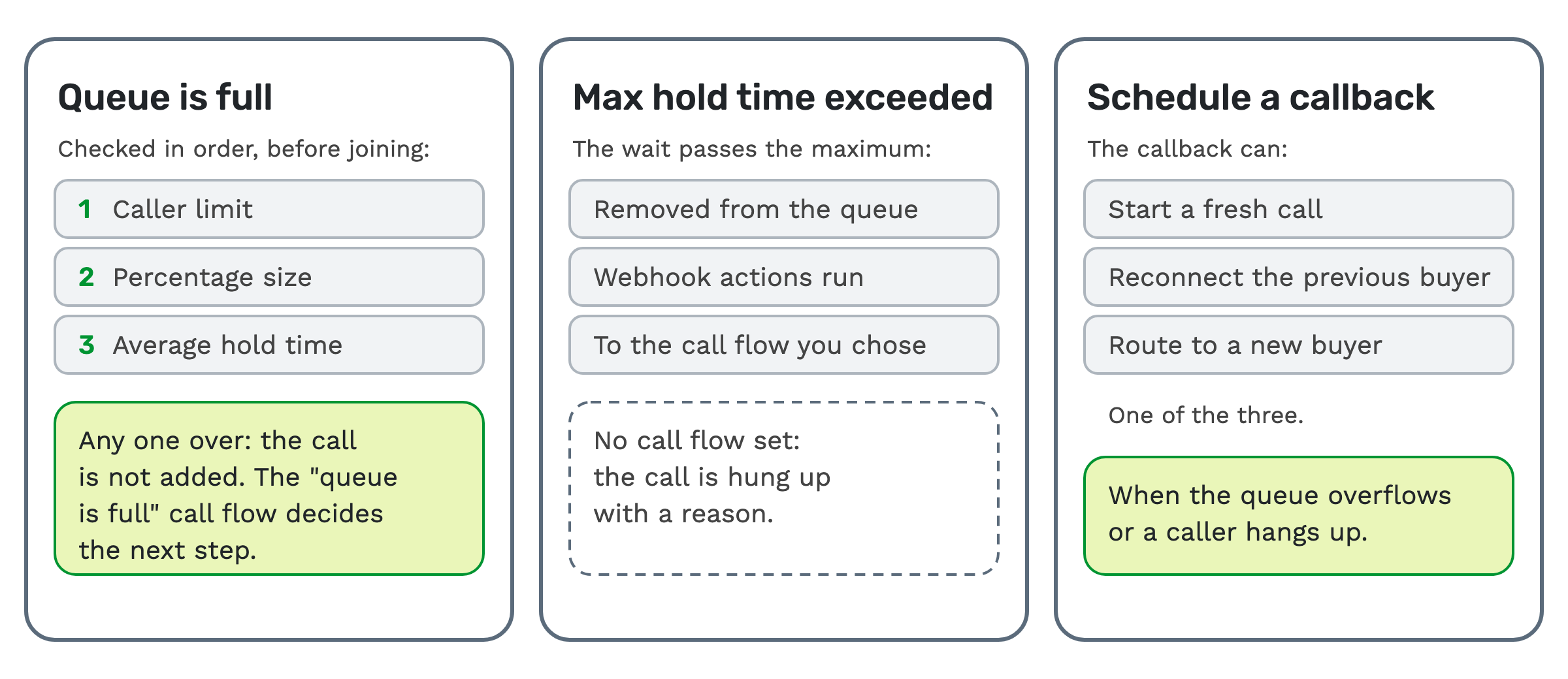 Queue is full. The caller is not added to the queue. The "queue is full" call flow decides the next step, and one
choice is to schedule an automatic callback for later.
Max hold time exceeded. The caller is removed from the queue once the wait passes the maximum hold time. Any webhook actions you set run, and the call goes to the call flow you chose.
A webhook sends call data to another system the moment an event happens.
If no call flow is set for a caller past the maximum hold time, the call is hung up with a reason.
Scheduled callbacks: when waiting isn't the answer
A scheduled callback is a lead set to be dialed at a specific future time. When that time comes, the dialer picks the lead up.
Typical uses are a "call me back at 3pm" promise made during an inbound call, and appointment-style nurture.
You can schedule a callback when the queue overflows or a caller hangs up. The callback can do one of three things:
- start a fresh call,
- reconnect the previous buyer, or
- route to a new buyer.
Recurring call rules stop duplicate or repeat callbacks within a window you set. They can also handle anonymous caller IDs, if you turn that on.
Callbacks run through the offer's schedules. A schedule is a set of steps run against a lead, such as a webhook, an email or a wait.
Each offer marks one or more schedules with the "Use for Scheduled Callbacks" setting. An offer always keeps at least one, and new schedules have the setting on by default. See the scheduled callbacks guide.
The hold queue and the power dialer
The same hold queue serves outbound dialing. A power dialer places outbound calls to consumers for your agents.
When a consumer is connected but every agent is busy, the caller holds instead of being dropped. On each dialer cycle, callers are sorted with inbound calls first, then oldest calls first.
The dialer then matches each held caller to an available agent. Pacing is the rate at which the dialer places calls.
The hold queue doesn't slow that rate on its own. A growing queue is a sign of a pacing problem, so watch the queue's depth and adjust pacing. The power dialer hold queue guide has the details.
Seeing why a call didn't reach a buyer
The call router records every buyer it tried, the dial result for each, and why any buyer was skipped.
A hold queue timeout is one of the reasons it records, next to caps reached and a schedule mismatch. The troubleshooting guide explains where to look.
When a hold queue won't help
A queue only helps when a buyer is likely to open up soon. It suits a burst of calls that briefly outruns your buyers.
If every buyer is closed rather than busy, no buyer will open up soon. The "all buyers closed" exception call flow is the place to decide what happens to those calls.
What it costs on TrackDrive
Inbound calls have a per-minute tracking rate, one for local tracking numbers and one for toll-free, rounded up to the full minute. That rate includes forwarding the call to your buyer over toll-free or SIP; international and premium rate centers can add cost.
Scheduled callbacks are billed as outbound calls to consumers, at a per-minute rate. Outbound calls are billed on call duration, using the billing increment and minimum billable duration set for your account.
There's no onboarding fee. Committing to a monthly amount lowers most rates; see TrackDrive pricing.
Questions people ask
Is a hold queue the same as a call queue? Yes. "Call queue" is the general term. "Hold queue" is TrackDrive's name for its own.
What puts a call in the hold queue? A call reaches an offer and no buyer is immediately available. The "add to hold queue" call flow then fires during routing.
How long can a caller wait? Up to the maximum hold time you set for the offer. After that, the "max hold time exceeded" call flow decides what happens.
How big is the queue by default? 20 percent of the offer's total active concurrency cap, unless you set a caller limit or a percentage.
Can a caller who hangs up get a call back? Yes. You can schedule a callback when a caller hangs up, as well as when the queue overflows.
See it in action
Request a demo for a live walkthrough tailored to your use case, or start free, with no credit card and no onboarding fee.