Call recording for pay per call: finding and keeping recorded calls
This guide is for operators who run calls through a call tracking platform. If you want a recording saved on your own phone, your phone's help pages are the place to look.
Call recording saves the audio of a phone call so you can play it back later. In pay-per-call, a recording is the evidence of what happened on a call someone paid for.
Why recordings matter in pay-per-call
A buyer is the business that receives and pays for calls. When a buyer says a call didn't qualify, the recording shows what the caller said.
TrackDrive lets you review exactly the part of the call you need for QA, disputes or coaching. QA, or quality assurance, is checking calls against the standard you set.
When a call is recorded
Call recording is on by default. It's a company-level setting. A company can turn it off only when three things are true. Its account has been granted that ability, the company is verified, and the first-call notice has been sent.
Offers and buyers also have their own Record Calls setting, and a new offer's box starts checked. Some call types, such as voice agent calls, always record.
An offer is the campaign a call belongs to: its numbers, its buyers and its payouts. TrackDrive records both inbound and outbound calls this way.
One call can have several recordings
A single call can have more than one recording. Each has a type:
- The full call. The whole call, start to finish.
- Caller and agent. The caller's side and the agent's side only. An agent is a person on your team placing calls through the Power Dialer.
- Caller and buyer. The caller's side and the buyer's side only.
Each side of a call is called a leg. Keeping each pairing separate makes transcripts more accurate. It also lets each reviewer play the part that matters to them. The call recording guide lists the types.
How to find a recorded call in TrackDrive
The how to find a call recording guide covers each screen. In short, it takes four steps.
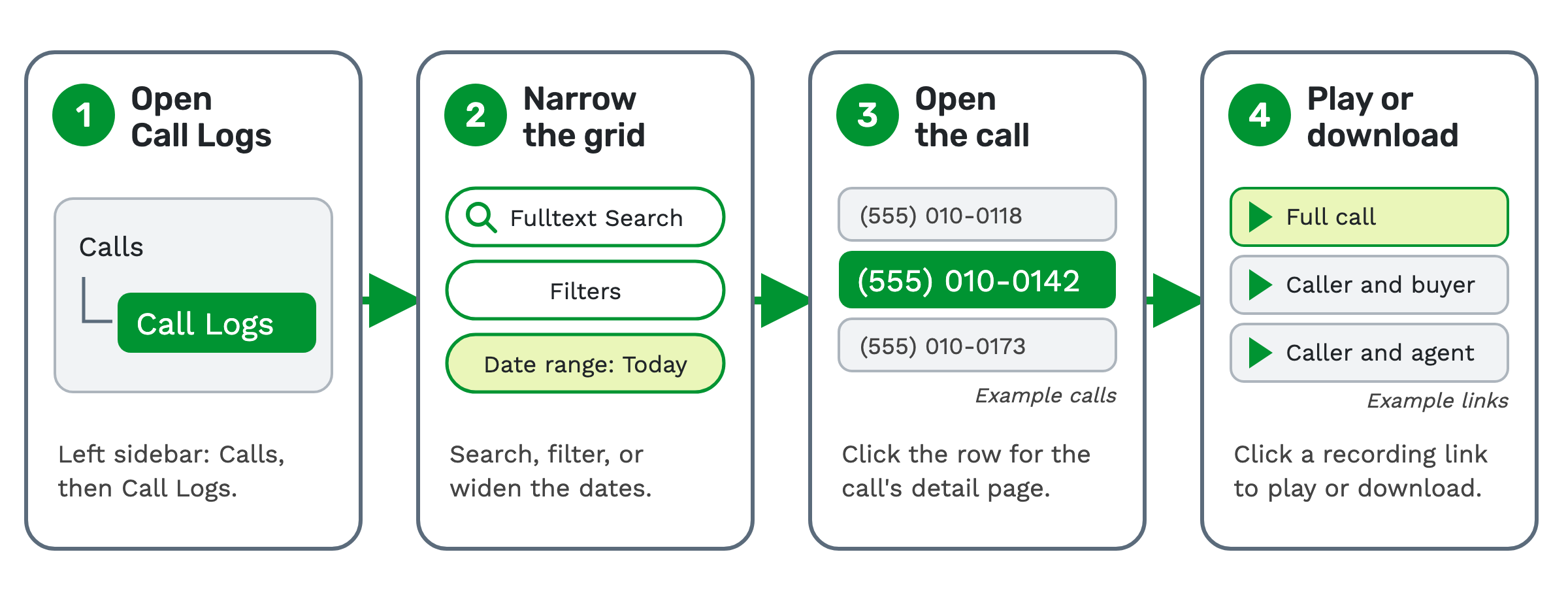 1. Open Call Logs. In the left sidebar, go to Calls, then Call Logs.
2. Narrow the grid. Use Fulltext Search, the Filters menu or the date range picker. The date range starts on Today, so widen it for older calls.
3. Open the call. Click the call's row to open its detail page.
4. Play or download. Each recording shows as a link with its length in minutes. Click it to open TrackDrive's audio player in a browser tab, where you can play and download the audio.
If you know the caller's phone number, paste it into Fulltext Search. That's the fastest way to the call.
A call can show several links: the full call, the two-party recordings, and an answering machine detection recording when that check ran.
When the recording shows up
Recordings appear shortly after the call ends. For most calls that's within seconds. Long calls and busy periods at the telephony provider can stretch it to a minute or two.
Why a recording might be missing
If a call has no recording, the usual reasons are:
- Recording is turned off on the offer. Check the offer's recording settings.
- The audio upload hasn't finished yet.
- The recording was deleted under a retention rule. Each deletion is logged on the recording, with the retention period that caused it.
Playing a recording
The call recordings page shows the player. A waveform, a picture of the sound, shows the agent and customer channels. Click any point to jump there.
With AI call transcription on, sentiment markers sit along the waveform. The transcript, labeled by speaker, follows along as the audio plays.
Who can hear a recording
Team permissions decide who can play or download recordings.
On the offer, authorization-required playback is the Password Protect Recordings setting. It starts unchecked, and buyers have the same setting.
With it on, a recording opens only for a logged-in user in your account. It's served through short-lived signed links, not public web addresses.
Getting recordings into your own systems
A webhook sends data to another system the moment something happens. A recording webhook fires as soon as a recording is ready, with separate events for the agent, buyer and full-call recordings.
With data exports, you can export calls and call recordings to a CSV file, once or on a recurring schedule. The AWS S3 integration uploads data, including recording URLs and files, to your own Amazon S3 bucket. The upload happens when an S3 action runs in a schedule or automation.
How long recordings are kept
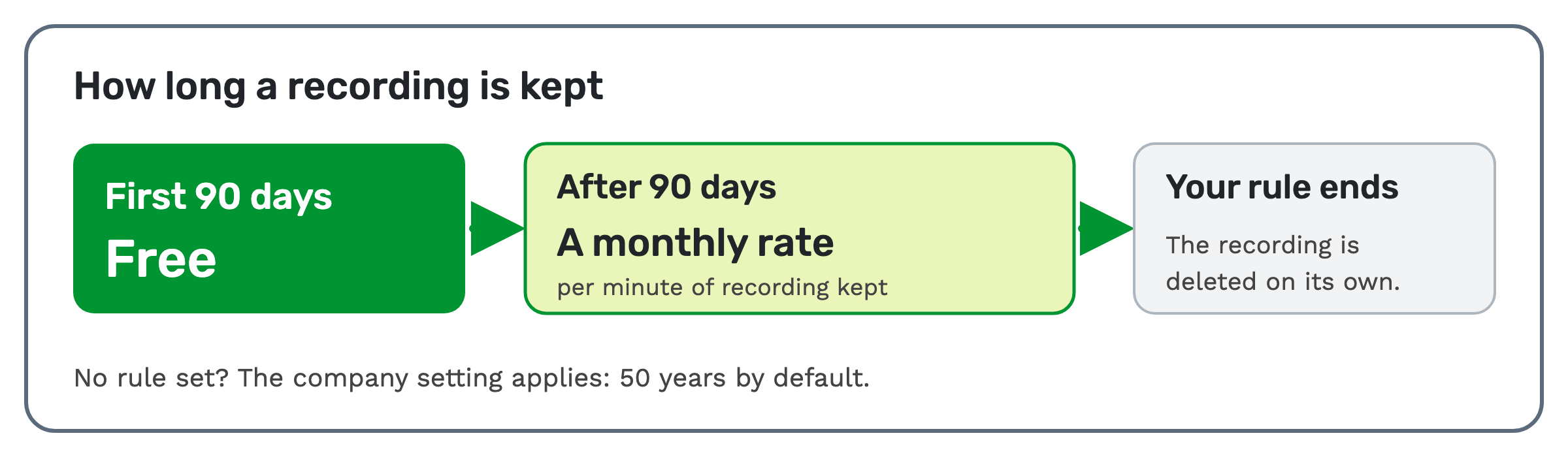
A retention rule sets how long a recording is kept. You can set rules per call type, offer, schedule, buyer or traffic source. Once a recording is past its window, it's deleted on its own.
If you set no rule, the company-level retention setting applies; its default is 50 years.
 Even so, TrackDrive isn't built to be your long-term archive. In its own words, the platform isn't "designed or
guaranteed to serve as a permanent or long-term repository" for recordings. Export the recordings you must keep, or
send the audio to your own S3 bucket.
Audio quality on every recording
Every recording carries an audio quality score: MOS, quality, packet loss and jitter, with dead air and one-way audio flagged. MOS, or mean opinion score, is a standard rating of how clear a call sounds.
The score helps you tell a bad call from a bad connection before you press play. It is not the same as a call quality score, which grades what was said against your scorecard.
Recording and consent: general education, not legal advice
This section is general education. It is not legal advice, and rules differ by state and by industry, and they change often.
Some places require every person on a call to agree to a recording, not just one. A call can cross state lines, so a common habit is a short notice at the start of the call. For example: "This call may be recorded for quality and training purposes."
In TrackDrive, a call recording announcement is a pre-recorded message played at the start of the call. You set it up in the offer's call flow.
TrackDrive's own notice says its tools "do not, on their own, guarantee compliance". Confirm the current rules with qualified counsel or your compliance team before you launch.
What it costs on TrackDrive
Recording retention is free for 90 days, then a monthly per-minute rate. Commit plans lower it only at the two largest commit levels.
See TrackDrive pricing for every rate. There's no onboarding fee.
Questions people ask
How do I find recorded calls? Go to Calls, then Call Logs, and search or filter for the call. Open it, then click a recording link to play it.
Can I download a recording? Yes. The audio player that opens from the call's detail page plays and downloads the audio.
Is the audio redacted? TrackDrive's pages describe redacting transcripts and call data, not the audio itself. Recordings are handled by retention. See PII redaction for calls and transcripts.
Why is a call missing its recording? Recording may be off on that offer, the upload may still be running, or a retention rule deleted it.
See it in action
Request a demo for a live walkthrough tailored to your use case, or start free, with no credit card and no onboarding fee.