Buyer caps and concurrency: how many calls a buyer can take
Call concurrency is the number of calls in progress at the same moment. A buyer's concurrency limit is the most live calls it can hold at once.
A cap is a different limit. Most caps count over a period of time, such as an hour, a day or a month.
TrackDrive calls the concurrency limit a concurrency cap, but it counts only live calls.
The short version: caps are about the total over time, and concurrency is about right now. A buyer is the destination that receives live calls, such as a call center, an agent or a SIP endpoint.
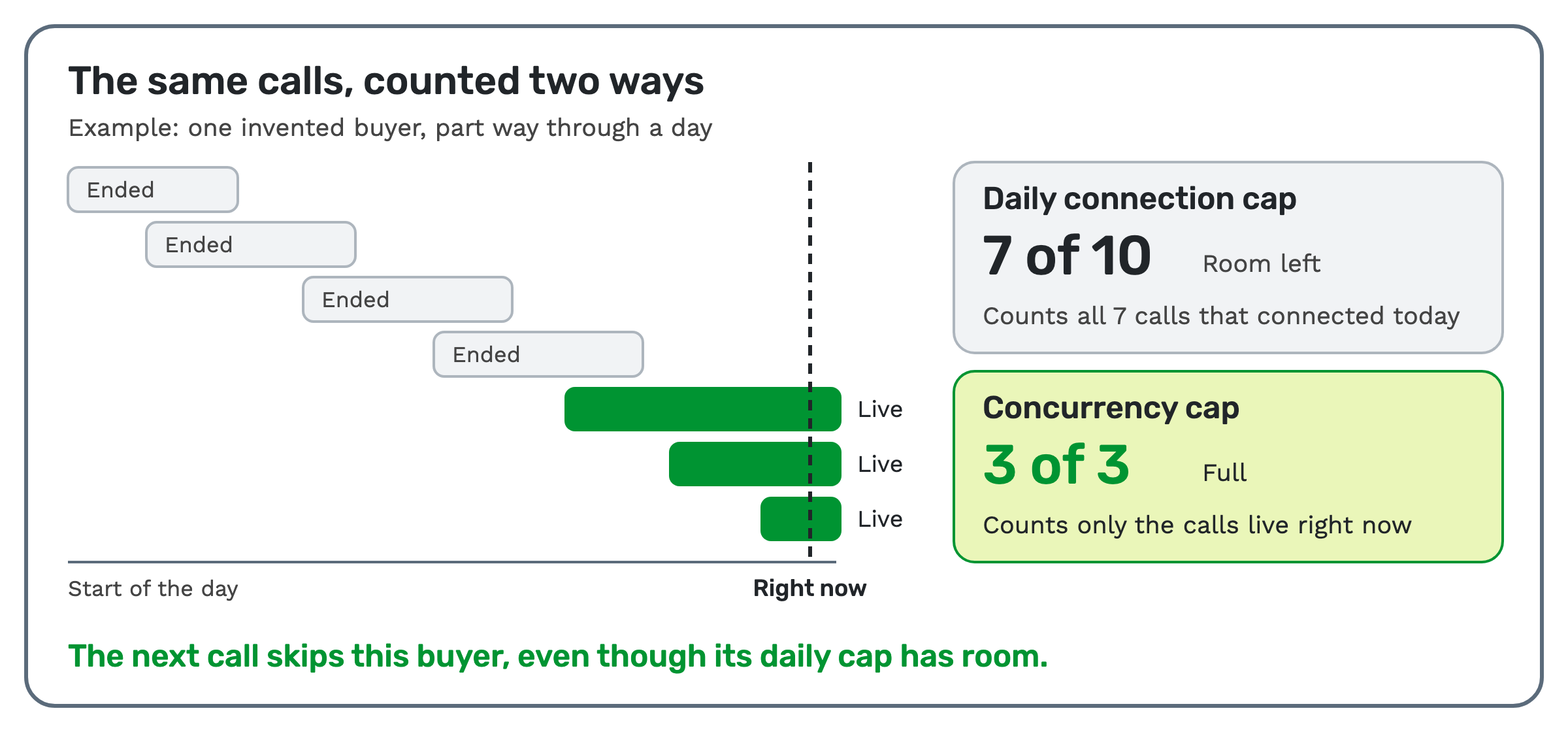
The same calls, counted two ways
Here's an invented example. One buyer has a daily connection cap of 10 and a concurrency cap of 3.
So far today, 7 calls have connected. Of those, 4 have ended and 3 are still live.
The daily count reads 7 of 10, so the cap has room. The live count reads 3 of 3, so concurrency is full.
The next call skips this buyer, even though its daily cap has room. When one of the live calls ends, the live count drops and the buyer is below its limit again.
Run the same invented day forward: 10 calls have connected and none are live. Concurrency is wide open, but the buyer gets no calls until the daily cap resets.
What is call concurrency?
Concurrency only looks at this moment. The count rises when a call goes live and falls when one ends, so there's nothing to reset.
For example, a buyer with five agents can take five calls at once. The sixth caller would have to wait, or be sent somewhere else.
You'll also see the phrase "concurrent call capacity". It's the same idea: how many calls can run at the same time.
In TrackDrive, every buyer has a concurrency cap, which is its maximum number of simultaneously live calls. If the buyer is at capacity, the call flow skips to the next buyer.
A call flow is a rule that decides what happens next in a call.
How to work out concurrent call capacity
Start by asking the buyer two things: how many calls it can handle in a day, and how many at the same time. Then ask whether that capacity can grow.
If the buyer only knows its hourly volume, a rough sum helps. Multiply calls per hour by the average minutes per call, then divide by 60.
An invented example: 30 calls an hour at 6 minutes each is 180 minutes of talk, or about 3 calls at once.
That figure is an average, and calls don't arrive evenly. Ask about the busiest hour too, and set the limit the buyer can really staff.
What are buyer caps?
A buyer cap limits the calls, conversions or revenue a buyer can take in a given window. Caps protect buyers from overflow and enforce contractual volume limits.
A daily, monthly or total cap pairs what it counts with that interval. It can count any of these:
- Attempts. Every dial attempt, whatever the outcome.
- Connections. Calls that reached the established status, whether or not they converted.
- Buyer conversions. Successful buyer conversions. A call can be marked converted by duration, ping-post or API postback.
- Revenue. The payout dollars generated by the buyer.
Which of these you can use depends on the cap types your company has enabled.
The intervals are daily, monthly and total, and hourly caps are set separately. There is no weekly cap.
Hourly, daily and monthly caps reset on their own. A total cap never resets on its own; its limit can be raised by hand.
A daily cap resets at midnight in the buyer's time zone. A monthly cap resets on the first day of the month, also in the buyer's time zone.
A buyer at its cap isn't paused. It's marked as maxed out and isn't considered for calls while it's at that cap.
Several caps can sit on one buyer, with different types and intervals. The buyer is maxed out as soon as any one of them is reached.
TrackDrive also has a spacing cap, which enforces a minimum number of seconds between calls. It has no interval and resets continuously, based on the time of the most recent call.
How these limits work when a call arrives
TrackDrive checks each buyer on the call router before ranking anyone. Caps and concurrency are checked along with the buyer's hours and filters.
Concurrency, hourly, daily, monthly and total caps are all checked. A buyer that has reached any limit is skipped automatically.
The eligible buyers are then tried in priority order, and the first one that can take the call gets it. The full sequence is in how to route inbound calls.
A buyer group applies shared settings to several buyers at once, and it can be set up with shared caps.
Those enforce attempt, connection, conversion and revenue limits across all member buyers, plus hourly caps and concurrency at the group level.
When any group cap is reached, the group and all its buyers are removed from routing until caps reset or are adjusted.
What happens when every buyer is full
A default call flow fires when every eligible buyer is at capacity. Call routers list "no buyers have open concurrency" among their exception triggers.
When no buyer is immediately available, an offer, the campaign a call belongs to, can park the caller in a hold queue. The caller hears hold audio while TrackDrive re-checks for a buyer that opens up.
Concurrency also shapes that queue. Its default size is 20 percent of the offer's total active concurrency cap, unless you set a caller limit or a percentage.
So when the default is in use, changing concurrency limits can change how many callers fit in the call queue.
TrackDrive checks the caller limit, then percentage size, then average hold time. If any one is over, the call isn't added and the "queue is full" call flow decides.
A queue fits a concurrency limit better than a daily cap. A busy buyer opens up when a call ends, but a buyer at its daily cap stays out until the reset.
Setting caps and concurrency in TrackDrive
The caps form appears only on an already saved buyer. The new-buyer wizard doesn't show it, so create the buyer first and then edit it.
Confirm the buyer's time zone, then open Caps and click Manage.
Enter a Limit for each combination you want, and leave a field blank to impose no cap on it. Then click Save Caps.
Each row pairs a read-only Used count with your Limit. When Used reaches Limit, the row is highlighted in red and the routing algorithm skips that buyer.
Daily, monthly and total caps are set on that form. Hourly and concurrency limits sit in a separate business-hours table below the Caps option.
That table appears only when the buyer has the hourly_caps or concurrency_cap permissions. It also appears only on the standard buyer edit page, not in inline or bulk edit.
In that table, superusers can add business-hour ranges, each with its own hourly and concurrency limits. That lets one buyer's limits change through the day.
Seeing why a buyer was skipped
Open the call's event log on the call detail screen. The call router records every buyer it attempted, the dial result for each, and the reason a buyer was skipped.
Those reasons include caps reached, a schedule mismatch and a hold queue timeout. To watch these numbers over time, see the pay-per-call metrics to check every week.
When fewer limits are enough
You don't need every limit on every buyer. On the Caps form, a blank field imposes no cap.
Set only the daily, monthly and total limits that match the deal.
If the buyer has agreed a daily number, use a daily cap. If its limit is the number of agents free at once, use concurrency.
Start with conservative caps and widen them as quality is proven.
What it costs on TrackDrive
TrackDrive's pricing page has no separate line for caps or concurrency. It does list a fee per inbound call that can't be routed and is rejected, so plan where overflow goes.
There's no onboarding fee.
Questions people ask
What does call concurrency mean? It's the number of calls in progress at the same moment. For a buyer, the concurrency limit is the most live calls it can hold at once.
What's the difference between a cap and concurrency? A cap counts over a period, such as a day. Concurrency counts only the calls that are live right now.
Do caps reset by themselves? Hourly, daily and monthly caps reset on their own. A total cap never resets on its own; its limit can be raised by hand.
Can a group of buyers share a limit? Yes. A buyer group can enforce shared caps across its members, plus hourly caps and concurrency at the group level.
See it in TrackDrive
Request a demo for a live walkthrough tailored to your use case, or start free, with no credit card and no onboarding fee.